A cutting tool compatibility RFQ should connect the machine interface, holder or cutter body, insert or cutting tool, workpiece material, operation, feature dimensions and current problem. Include complete model codes, drawings or clear photos, quantity, destination and target date. KENFA can then identify missing information and review the closest catalog route without assuming an unverified equivalent.
What compatibility chain should an RFQ document?
| Compatibility layer | What to send | Typical mismatch to prevent |
|---|---|---|
| Machine interface | Machine, turret, spindle, arbor, collet or clamping standard | Tool cannot be mounted or lacks clearance. |
| Holder or cutter body | Complete code, hand, approach, shank or arbor dimensions and photos | Seat, clamp, orientation or body interface differs. |
| Insert or cutting tool | Complete designation, grade, chipbreaker or geometry suffix and package photo | A similar family is mistaken for the exact model. |
| Workpiece and operation | Material grade, hardness, operation, cut type and current issue | A model is reviewed outside its actual application context. |
| Finished feature | Dimensioned drawing, tolerance, surface or inspection requirement | The tool fits the assembly but not the feature. |
| Commercial requirement | Trial and repeat quantity, destination, target date and requested documents | The technical review lacks quotation context. |
Which files are most useful?
- Dimensioned PDF drawings or clear images of the finished feature.
- Photos of every tool label, package, seat, clamp and machine-side connection.
- A list of current model codes copied exactly, including spaces, hyphens and suffixes.
- Wear, chip, finish or failure photos when the request concerns a machining problem.
- A concise note separating required facts from preferred targets.
What does KENFA review after submission?
The inquiry can be routed to the relevant product family, missing data can be identified and the closest catalog path can be checked. Compatibility, cutting conditions, price, stock and delivery remain subject to the selected model and final quotation.

Which pages help prepare the request?
- Cutting Inserts for insert-code and holder-seat inquiries.
- Boring Tools for bar, insert, sleeve and internal-feature inquiries.
- Cylindrical Tool Holders for seat, clamp, hand and shank checks.
- How to Read an ISO Turning Insert Designation
- How to Select a Small-Hole Boring Tool
- Grooving and Parting Stability
- Thread Production and Inspection
- Catalogs & Technical Resources
How should buyers submit the RFQ?
Use the KENFA RFQ form and attach only files needed for technical review. Review the Privacy Policy before uploading drawings or photos, and remove unrelated personal or confidential information.
Buyer Questions
Can KENFA review another brand’s model code?
Yes. Send the complete code, manufacturer, holder or body, application and clear photos; the result is a review request, not an automatic equivalence claim.
What if the current code is unreadable?
Send package and tool photos, measured dimensions, holder or machine interface and the finished-feature drawing.
Should buyers include current cutting conditions?
Yes, as troubleshooting context. They do not become recommended values until the selected model and application are reviewed.
Can price and delivery be confirmed before compatibility?
Those commercial fields depend on the selected model, quantity and destination and are confirmed through quotation.
Source Notes
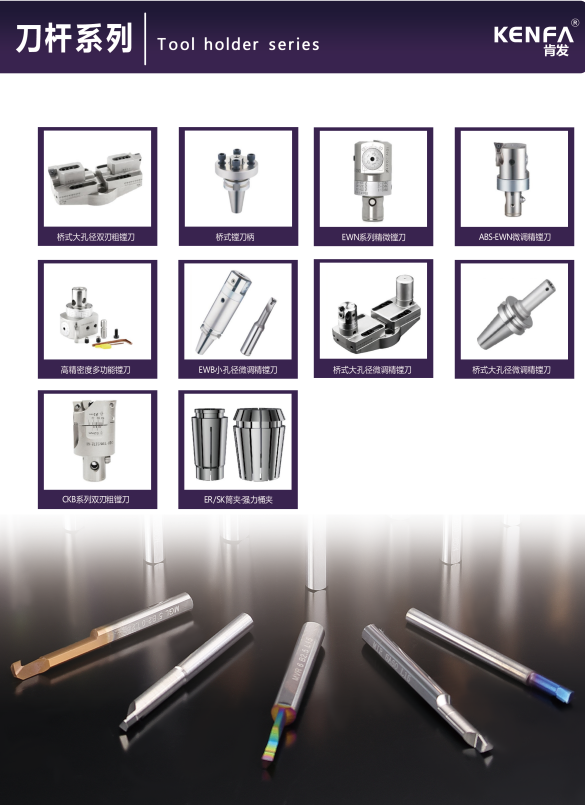
This guide follows the validated fields in the KENFA RFQ workflow and the compatibility boundaries used across the 16 product-family pages. Catalog image CI-57 shows holder-family context; BP-10 is used only as a team-communication visual and does not establish engineering capacity or response times. Last reviewed July 12, 2026.